Comments in GDL (Geometric Description Language) are far more than just notes in the margin — they are an integral tool for readability, maintainability, and collaboration. Here is a structured overview:
Syntax: In GDL, comments are initiated with an exclamation mark: ! This is a comment. Everything after the ! on this line is ignored by the interpreter.
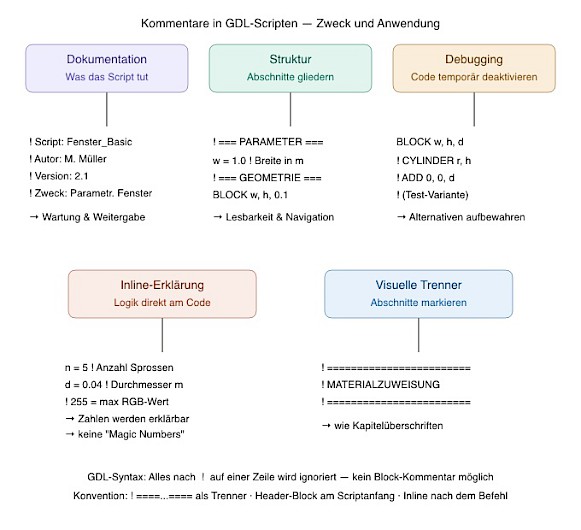
The five areas of use in detail
1. Documentation block at the beginning of the script
Every GDL script should begin with a structured header that explains at a glance what the object is, who created it, and what was changed:
! ============================================================
! Script:   Fenster_parametrisch.gsm — 3D-Script
! Autor:    Max Mustermann
! Datum:    2024-03-15
! Version:  2.3
! Zweck:    Parametrisches Fenster mit variablen Sprossen
! Änderung: V2.3 — Kämpfer-Option hinzugefügt
! ============================================================
Without this block, you have to read the entire script to understand what it does at all — particularly problematic for objects you open again months later or take over from colleagues.
2. Section divider lines for structuring
GDL scripts can quickly become several hundred lines long. Visual divider lines make sections navigable — similar to chapter headings in a book:
! === PARAMETER-BERECHNUNGEN ===
h_rahmen = h - 0.06
b_rahmen = w - 0.04

! === GEOMETRIE — RAHMEN ===
BLOCK b_rahmen, d, h_rahmen

! === GEOMETRIE — VERGLASUNG ===
CUTPLANE ...
3. Inline comments — no "magic numbers"
Bare numbers in code are one of the most common sources of errors. Who remembers three months later why 0.04 or 255 is there?
! Bad:
RGB_R = RGB_R / 255

! Good:
RGB_R = RGB_R / 255  ! Normierung: RGB 0–255 → GDL 0–1

! Bad:
n = 5

! Good:
n = 5  ! Anzahl der Quersprossen (ungerade = symmetrisch)
4. Debugging — disable code without deleting it
An enormous practical advantage: you can comment out geometry variants or test outputs with ! without deleting them. This allows alternatives to be kept directly in the script:
BLOCK w, h, d          ! Aktive Variante: Quader

! CYLINDER w/2, h      ! Test-Variante: Zylinder
! ADD 0, 0, d          ! zugehörige Verschiebung
5. Explaining conditional sections
Especially with IF/ENDIF constructs, a comment helps enormously to understand the logic immediately:
IF typ = 1 THEN        ! Typ 1 = Holzrahmen
    ...
ELSE                   ! Typ 2 = Aluminiumrahmen
    ...
ENDIF
Important limitations
Compared to PHP, Python, or other languages, GDL has a significant difference: there are no block comments. In Python you write """...""", in PHP /* ... */ — in GDL each individual line must start with !. This is cumbersome when commenting out larger sections, but can be solved with a good text editor (Sublime Text, VS Code) using a keyboard shortcut.
Conclusion: Comments cost a few seconds when writing — when waiting, debugging, or handing over a script, they save hours. In professional GDL libraries (e.g., from GRAPHISOFT itself), well-commented scripts are therefore the hallmark of quality ;-).
```