Overview
This article describes the use of the project management system "Rukovoditel" as a development environment as a Swiss Army knife for GDL developers.
- Article from b-prisma.de from March 6, 2018
I have searched for a long time for a good project management system for my work as a GDL programmer.
I actually never found what meets all my requirements.
During this long search on the Internet, just at the moment when I had decided to end my search for the next attempt,
Rukovoditel appeared, a universal project management tool made in Russia.
What does "Rukovoditel" mean? In essence (in the context of the topic) something like a system that "guides" you through your work processes.
Rukovoditel is open source and can be easily self-hosted with the simplest means, i.e. it can be extremely easily installed on hosted servers with PHP and MySQL.
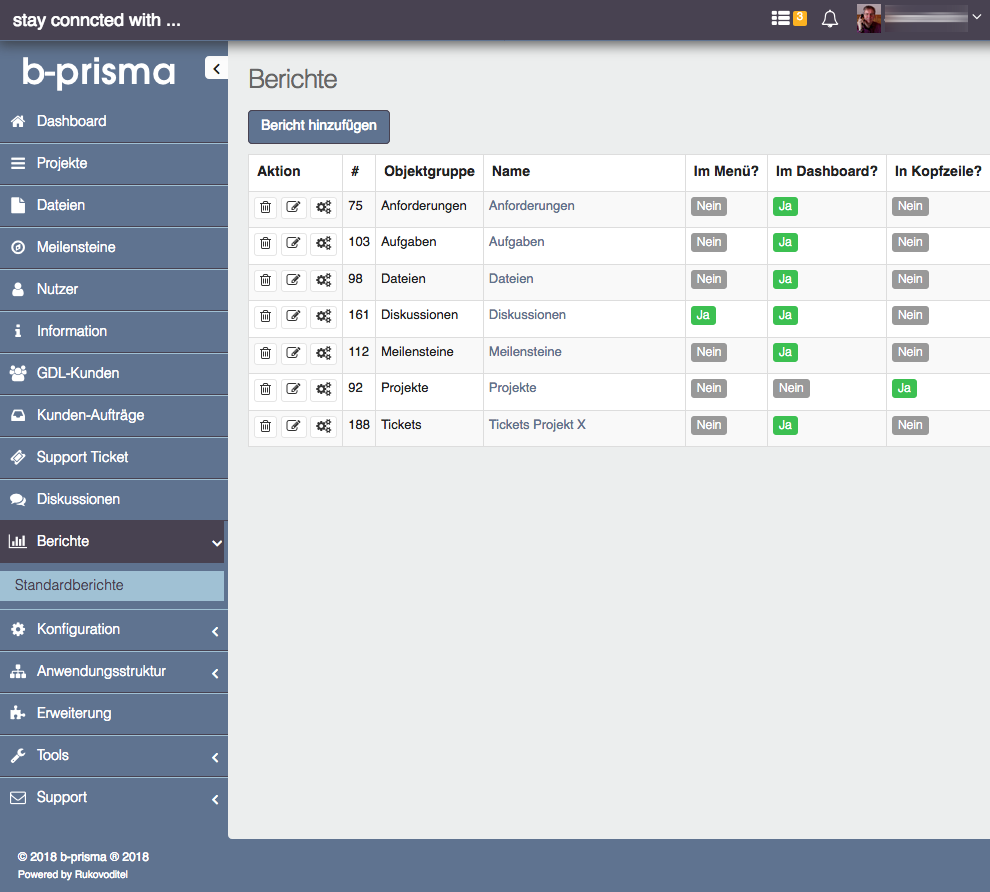
Image 1: User interface for the admin: Reports editor
Rukovoditel appeared last, but is at the top of my favorites list because it is very universally applicable and extremely flexibly customizable and has a very pleasant and modern, responsive user interface.
I was surprised that such a brilliant thing exists as open source, a program with which you can basically build your own web application freely.
Usage is very easy, but as an administrator you do need some time to familiarize yourself before you have seen behind all or most of the functions and how they work.
Users who are not admins have it much easier. They find their way very quickly in the clear structure.

Image 2: User interface for ticket system users: Dashboard
In addition to the free open source version, there is an extension for approximately 185 euros with very nice additional features (Image 3)
However, the basic version is already unlimited, i.e. you can register as many users as you want, create and manage as many entities (object groups in the form of categories and associated records) as you want.
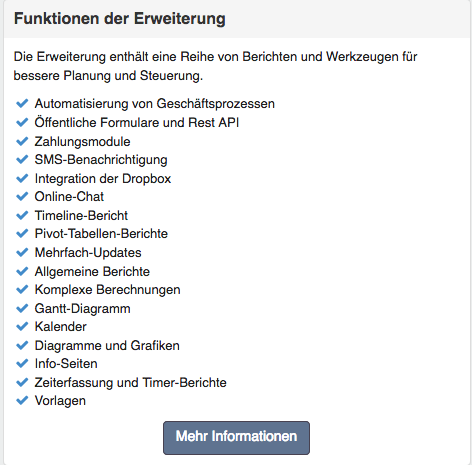
Image 3: Features of the paid extension
Universal tool
With Rukovoditel it is possible to use the software as task management, project management tool, ticket system, bug report system, communication platform, CRM system and more, and at the same time all of the above in one.
The software is multilingual, meaning that in addition to the standard languages English and Russian, you can add additional language packs from the user forums very easily, so that each user can choose their own user interface language.
German is also included and since the two language files are of the .php type, you can, if you want, replace certain terms if they fit better in your own context.
On the dashboard you can freely display the reports relevant to you, unfiltered or filtered. (e.g. all active tickets, uncompleted tasks, etc.)
To use existing records from your company, it is possible to export them from an Excel file and import them into Rukovoditel.
I myself am a software developer for BIM objects and have created the following different functions with it: customer database, product database, object catalog with release notes, project management with todo list and ticket system, project-independent ticket system.
Application examples
Here are some examples:
Project-independent ticket system
For project-independent communication, e.g. for non-individual software, the following system can be set up: The customer creates their own account on a website that is not found by search engines due to spam, or an account is created for them by the admin. They then log in and create a report in which they post their bug reports and the operator can respond to them. If you have purchased the extension, you can automatically assign certain reports to new users via templates. This ticket system is clear and especially for the operator of the site a great advantage, since they have all tickets in one central place, clearly organized by user, purchased software and bug type.
Image 4: multiple tickets from different users for different products collected in one report.
Project-dependent ticket system
Works basically the same as the project-independent one, with the difference that it is assigned to projects and is completely independent of the project-independent ticket system.
Customer database
Here I created a main object group for customers and a subgroup for the tasks performed. This way I have a clear overview of all tasks at a glance and can search for, e.g., certain types of BIM objects that I created at some point by filtering or searching. This area is independent of the actual projects, contains all older tasks and an overview of the new ones. (Not every task has to be handled via project management with to-do lists, tickets, etc.). The task list can be displayed globally or for the individual customer.

Image 5: Overview of all customer tasks, arbitrarily sortable and filterable, with sum formation in revenue.
Project management
In the main object group "Projects" I can create as many sub-object groups as I want, which are then offered as a subselection when selecting a project; here these are files, tasks, discussions, tickets, requirements, workflows and milestones. These sub-object groups can contain any number of self-defined fields. Using a sophisticated rights system, you can grant customers access to only certain parts, and here in turn with full access or with "view only". If you have purchased the extension, you can expand the PM with calendars, Gantt charts, diagrams and graphics, time tracking and more. There are "almost" no limits to flexibility.

Image 6: Overview of the project management sections within a project.
BIM Objects and Release Notes
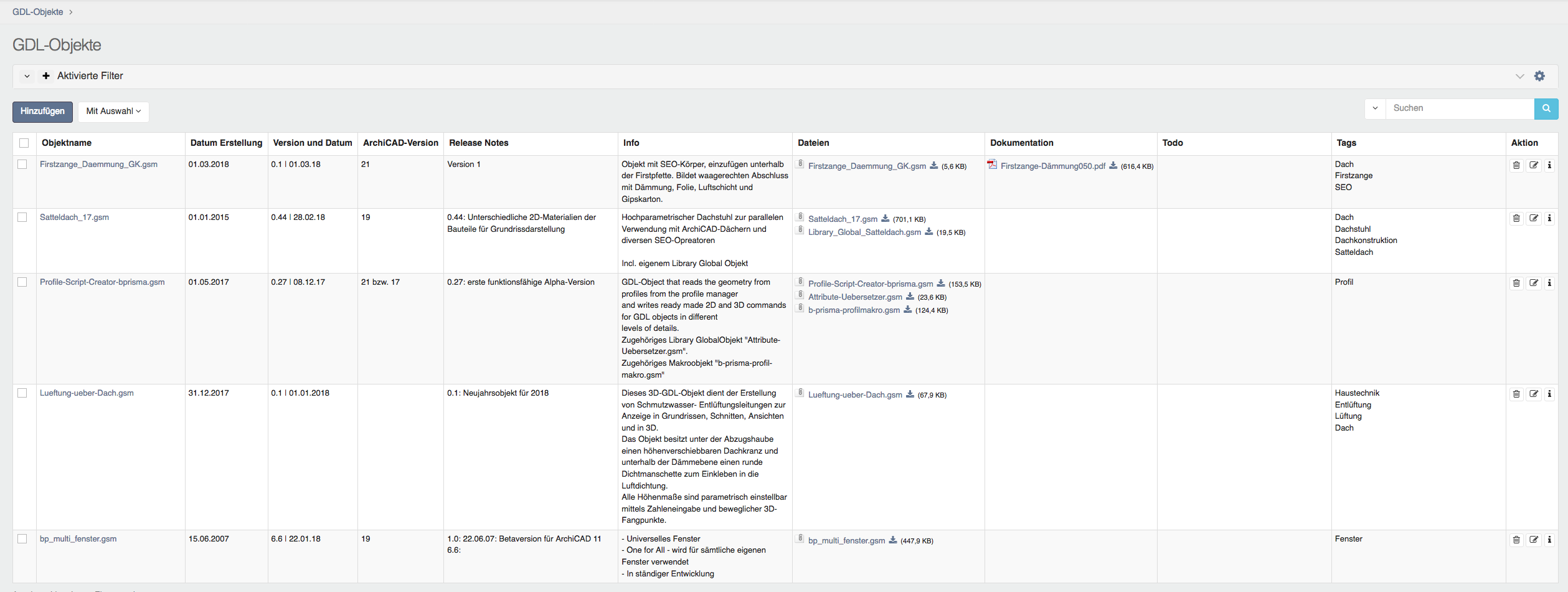
I created the object group "GDL Objects" as a main group without subgroups. Here I collect self-created and self-used BIM objects (e.g. tools for object development). Here I store, in addition to information about the objects, release notes, development notes, todos, current file versions and documentation. I also have a "Tags" field to be able to find certain objects with certain properties in the search dialog.
Extension
I also used the extension as a test version. I was particularly impressed with the following functions:
- Info Pages: with this you can create content pages like in a CMS, e.g. for usage instructions for external users or wikis.
- Public Forms: with this you can create external feedback forms for different uses. The sender can receive a confirmation email which contains a link whose destination informs them of the status of their request. This way, for example, a customer can assign me a task and check in between how far I am with it, without having to call me.
- Change History: With this you can track and log arbitrarily filtered changes to all object groups.
- Shared Reports: This allows you to pre-configure lists for specific user groups, i.e. the dashboard of a user group always has the same pre-configured list view(s). Advantage: the user does not have to take action here to configure something, but can get started right away.
- API: with this it is possible to display content from the system or write content into the system on independent websites outside of the project management system. This is another brilliant feature because it allows external users to see or modify content without having to enter the PM via login, great! 2 examples: a) Customers can consent to the new data protection regulation, the result is written to the PM. b) a direct link in a GDL object displays the release notes of the object; the release notes are maintained within the system and displayed outside.
What else is there
I cannot praise the system enough. In addition to the features mentioned, I particularly like the following things:
- Extremely thoughtful and meticulously implemented details in all areas, e.g. different search criteria, access control for every single field, tooltips, etc.
- Integration of Fontawesome icons
- Comments can be added to each object group, so that each detail can be discussed separately
- Create global selection lists for dropdowns (Image 7)

- The developer operates a forum in which you always get quick and competent help with questions and problems; there is even a wish list for new features (Image 8)

- The software is in constant development; several new versions with new features are released every year.
- Freely customizable login page (Image 9)
Conclusion: a brilliant open source project management tool that has received far too little attention in this country, but not for people who are into Kanban boards like Trello.
```