How to open macro objects from within a script without knowing their path.
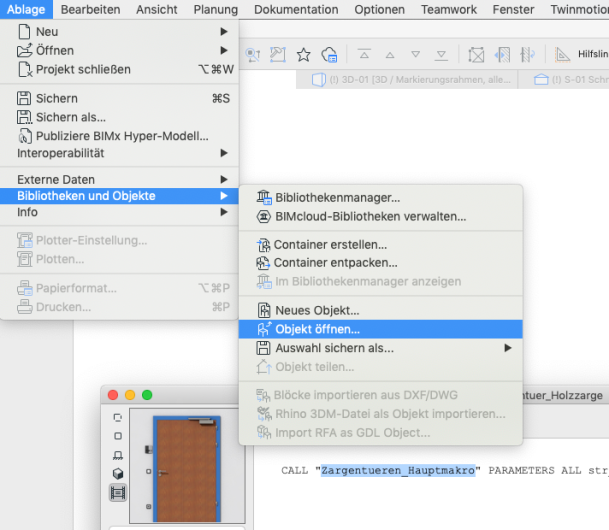
If you are in a script in which a macro object is called -using the Call command-, you can simply open the macro object by selecting the name between the quotation marks and then going to the menu "File >> Libraries and Objects >> Open Object". The macro will then be opened without you needing to know its path.
From Archicad 27 with the new GDL Editor, you need to use the corresponding button in the Script window instead of the File menu.
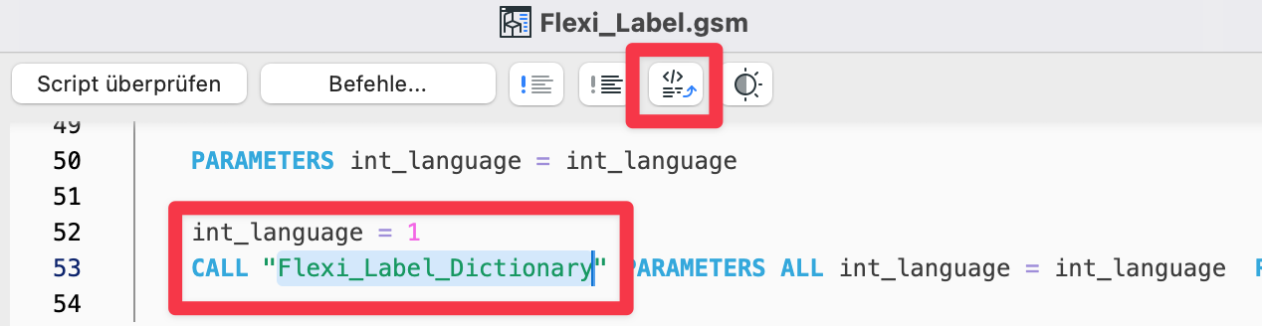
You can also use this as a trick to find an object that is located as a macro within an LCF file. You simply enter in the script:
CALL "MacroName" PARAMETERS ALL and open the macro object in the manner described.
By the way, this works not only with macros, but also with Library Global objects.

Limitations: On MAC it does not work with the keyboard shortcut, but it does work with the icon from the toolbar.