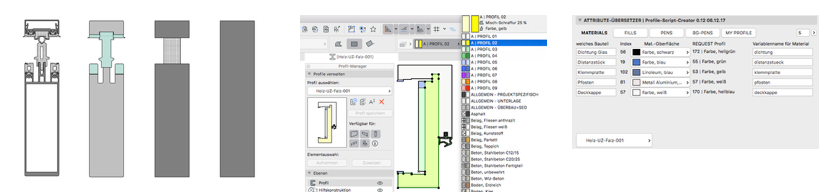
Since ArchiCAD 21, it is possible for GDL objects to use profiles from the Profile Manager. This opens up many possibilities. One possibility is the generation of 2D and 3D scripts that read the coordinates from the profiles of the profile manager and use them to create 2D hatches and 3D extrusion bodies.
The GDL object "Profile-Script-Creator-bprisma" takes exactly this approach, making it possible to convert profiles that exist as 2D hatches into 2D and 3D scripts very quickly, which can also be used for versions prior to ArchiCAD 21.
Features
- The object writes up to 5 different scale variants of a profile in both 2D and 3D as finished 2D and 3D scripts in subroutines.
- The output is provided in one text file each for the 2D script and the 3D script and master script (variable definitions)
- the following 2D commands are possible in each case: POLY2_B and later available: POLY2_B{6} plus hotspots
- the following 3D commands are possible in each case: PRISM_ + hotspots, planned for later versions are: cPRISM_{2}, bPRISM_, TUBE, TUBE{2}
- Definition of profile areas which are parametric from a geometric perspective
- the generated scripts are "ready to use"; you only need to define hatches and materials in the parameter lists
What you need
You need the following things:
- ArchiCAD 21 +
- Profile in the form of a 2D hatch in multiple scales; please create these profiles in the Profile Manager as independent profiles, e.g. "Schüco 1:1", "Schüco 1:20", "Schüco 1:50" etc.
- GDL object "Profile-Script-Creator-bprisma.gsm"
- GDL object "Attribute-Uebersetzer.gsm", which is a LibraryGlobal object.
- GDL object "b-prisma-profilmakro.gsm" for ArchiCAD from version 17 onwards: the scripts are written into this object
- Profile-Script-Creator.tpl: ArchiCAD template with pre-prepared building materials for the profiles, as well as example profiles for testing
- GDL-Nucleus (recommended): the source files for the GDL scripts generated in GDL-Nucleus can be overwritten directly by the Profile-Script-Creator. (Alternatively without GDL-Nucleus: You must transfer the scripts by copy and paste from the text files into the GDL objects)
Further details can be found in the PDF linked below and the video.