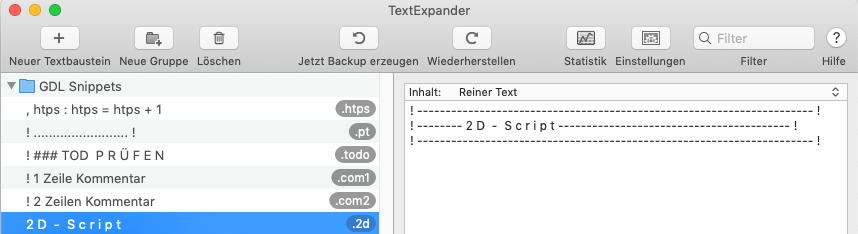
Text Expander
With the help of code snippets, you save yourself a lot of repetitive typing work, ensure that you create all code snippets in the same standard, and also save yourself from having to look up command syntax.
A tool that is available for both Windows and MAC OS, which I use and am very satisfied with, is "Textexpander".
Unfortunately, the latest version is only offered as a subscription, which is not nice, but there are alternatives.
The principle is as follows: I type a shortcut, e.g. ".hhm", then Textexpander converts it in every program on the operating system into a snippet, in this case "Hello Mr. Müller-Lüdenscheid, "
Other examples for programming follow:
! ---------------------------------------------------------------------- !
! -------- M A S T E R  -  S c r i p t ------------------------------------- !
! ---------------------------------------------------------------------- ! poly_x = 1
poly_y = 1
kont_typ = 7
poly_cont = L_
poly_fill = 1
poly_fill_pen = 1
poly_bg_pen = 0
poly_addx = 0
poly_addy = 0
PEN poly_cont
FILL poly_fill
ADD2 poly_addx, poly_addy
POLY2_B 5, kont_typ, poly_fill_pen, poly_bg_pen,
- poly_x / 2, - poly_y / 2, 1,
poly_x / 2, - poly_y / 2, 1,
poly_x / 2, poly_y / 2, 1,
- poly_x / 2, poly_y / 2, 1,
- poly_x / 2, - poly_y / 2, -1
DEL 1
It can be a short routine like "eps = 0.0001" or a complete subroutine.
In any case, the use of such a tool is highly recommended.
Auto-Completion
A similar function is offered by Sublime Text with the GDL-sublime-Build and Visual Studio Code with the GDL-Build from Graphisoft. You type 2 initial letters and can then select from a selection to complete the rest.
In Sublime it looks like this:
And in Visual Studio Code like this:
```