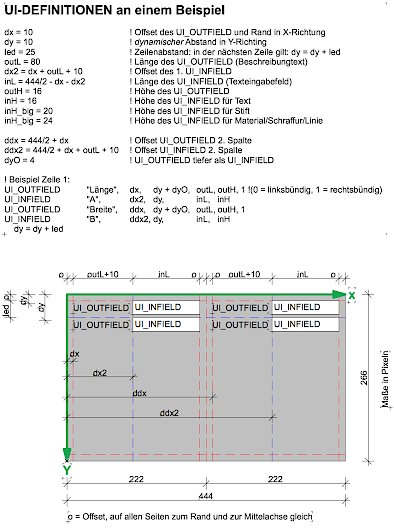
To achieve a consistent design of user interface, you should note how you want to divide a user interface, which margins and spacing you want to maintain, whether you want it in 1 or 2 columns, etc.
Very important for effective script usage is that you use exclusively variables for the spacing, lengths and heights in the user interface, which you define once, so that you can adjust the positions of infields and outfields centrally when defining the variables.
In the example shown above, the size of the available space (444 x 266 pixels) and the variables used for the spacing, lengths and heights are shown.
By the way, you can also define the width of the user interface larger than 444 pixels. From ArchiCAD 20 or 21, the width of the user interface automatically adapts to the defined width when calling the object settings, if this width is larger than 444 pixels.
I implemented an optimization of variable usage in my automatically generated user interface by redefining the variables before each outfield/infield combination in a "heading", so that I only have to adjust these headings if fine-tuning is necessary. Here is an example section for this:
_x_out = dx_out : _x_in = dx_in : _out_L = outL : _in_L = inL : _break = 1
UI_OUTFIELD "Höhe", _x_out, dy + dyOut, _out_L, outH, 1
UI_INFIELD "ZZYZX", _x_in, dy, _in_L, inh
dy = dy + _break * led
By changing the variables dx_out, dx_in, outL, inL and break = 1, which stands for a full-page layout, to dx_out_1, dx_in_1, outL_1, inL_1 and break = 0 for the 1st column of a 2-column layout and dx_out_2, dx_in_2, outL_2, inL_2 and break = 1 for the 2nd column, I can easily adapt the column layout line by line.